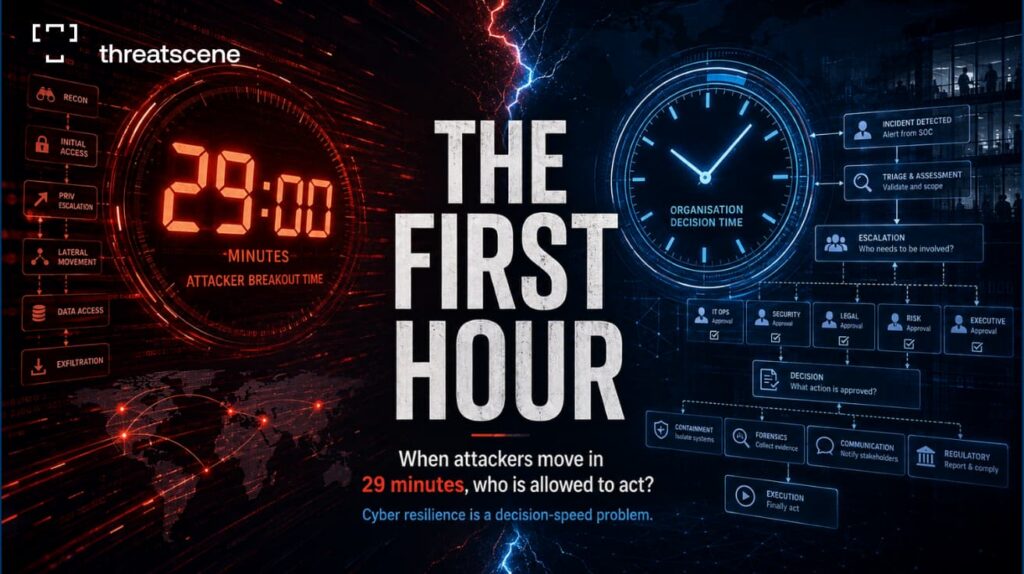
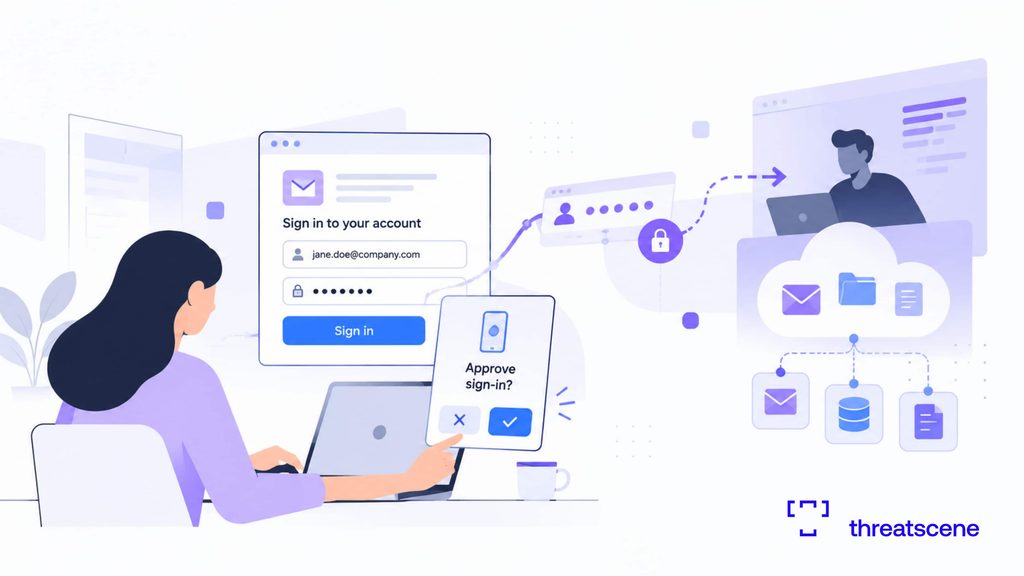
An employee forwards a worried message. They clicked a link in an email that looked like it came from IT, typed their username and password into the page it opened, and approved the prompt on their phone. Or it was a phone call, and they read a code aloud. Either way, the credentials are gone.
The instinct is to ask how they fell for it. Save that for the debrief. Right now, what matters is what the attacker can do with what they hold, and how fast you can shut it down.
Treat this as a potential security incident, not just an employee mistake. What follows is how to respond once it has already happened, in the order that keeps your options open.
Key takeaways
- A password reset is not containment. If the attacker holds a live session or token, the old password no longer matters.
- The gap between disclosure and report is your exposure window. Reward fast reporting. Don’t punish the mistake.
- The real work is scoping: what did the attacker reach, and did they leave a way back in.
- Notification duties can start the moment you become aware, depending on where you operate and what data was exposed.
- Credential theft is usually the first move in a larger intrusion, not the whole event.
What compromised credentials actually means
“Giving away credentials” covers a wide range, and the range decides your response.
At the simple end, someone typed a password into a fake page. At the harder end, they authenticated through an attacker-controlled proxy that captured the live session cookie after they passed MFA. In between sit disclosed one-time codes, push prompts approved under fatigue, and passwords lifted by infostealer malware straight out of the browser.
The account type matters as much as the method. A single SaaS login is one problem. Single sign-on that unlocks dozens of applications, or a privileged admin account, is a different order of problem.
Here’s how it often runs in practice. An employee approves a Microsoft push prompt at 22:40 and thinks nothing more of it. By the time they report it the next morning, an inbox rule is already moving every email containing “invoice” or “payment” into their RSS Subscriptions folder, and a supplier has received a payment-redirection email from the employee’s real address. The mailbox was the target the whole time. The password was just the way in.
This is also the reason a reset often fails to fix things. Modern phishing kits sit between the user and the real login page and steal the session cookie the identity provider issues after a successful sign-in. Microsoft documented one adversary-in-the-middle campaign that targeted more than 10,000 organisations, using stolen session cookies to reach mailboxes and run follow-on business email compromise. With a valid session token, an attacker can walk back in after the password changes, because the stolen item is the session, not the credential.
What an attacker can do with a stolen login
Credential theft rarely stops at the account itself. Verizon’s 2025 Data Breach Investigations Report, which analysed more than 22,000 security incidents, found credential abuse to be the most common route into a breach, involved in 22% of them.
With a working login, an attacker can:
- Read internal mail and impersonate the employee to colleagues, suppliers or customers
- Use the mailbox to trigger password resets on other accounts
- Reach connected systems such as CRM, cloud storage, finance and HR platforms
- Hunt for higher privileges and other systems to move into
- Run further social engineering from a trusted internal account, which almost nobody questions
- Download documents, customer records and intellectual property
The login is the doorway. What sits behind it is the incident.
The response, step by step
A useful response follows a repeatable arc: identify, contain, investigate, scope, eradicate, recover, then learn. The detail lives here once, so you’re not chasing the same actions across five different checklists. Each step is written as actions, not theory.
Identify
Confirm the facts before you touch anything.
- Which account, and which credential (password only, or a second factor too)
- How it was disclosed: typed into a page, read to a caller, or pulled by malware on the device
- When it happened, not when it was reported. The gap between those two is the window the attacker had
- Whether the account is standard or privileged, and what it connects to
Contain
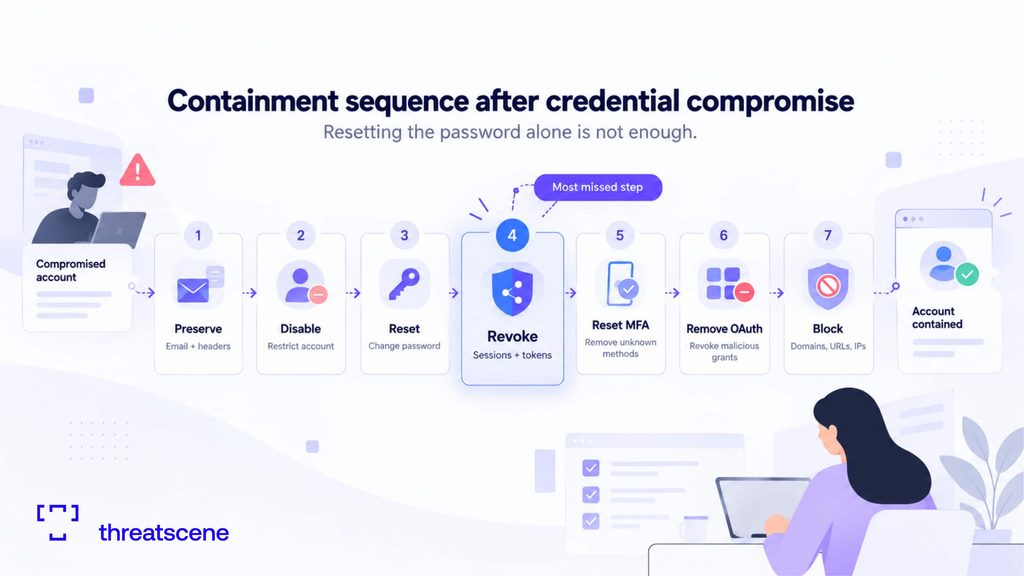
Order matters. Move too fast and you destroy the evidence you’ll need later. Work through it in this sequence: preserve, disable, reset the password, revoke sessions and tokens, reset MFA, remove OAuth grants, then block infrastructure.
- Preserve first. Keep the phishing email, its headers and the linked page before anything is deleted
- Disable or restrict the account
- Reset the password
- Revoke active sessions and refresh tokens. In Microsoft 365 you do this from Entra ID, which invalidates the refresh tokens, though already-issued access tokens can stay valid for up to about an hour depending on configuration. In Google Workspace, reset the user’s sign-in cookies from the Admin console. A password reset does neither of these on its own
- Review MFA methods, remove anything you don’t recognise, then re-register
- Check for OAuth app consents the attacker may have added. A malicious app granted mailbox access keeps reading mail after the password changes, which is exactly why the reset alone doesn’t end it
- Block confirmed malicious infrastructure: sender addresses, domains, URLs and IPs
Resetting the password without revoking sessions is the single most common mistake, and it leaves the attacker logged in.
Investigate
Now find out what actually happened. Read the evidence, don’t assume.
- Authentication logs, for unfamiliar locations, unknown devices and odd sign-in times. A sign-in from Athens at 09:00 followed by one from another country 15 minutes later is the classic impossible-travel signal
- Current and historical sessions, to see whether attacker sessions existed
- The mailbox, for hidden rules. Attackers routinely create a rule that files or deletes replies containing words like “invoice”, “payment” or “bank”, so the victim never sees the fraud running from their own account
- MFA changes and newly registered devices
- OAuth applications and their permissions, especially across Microsoft 365 and connected SaaS
- The full list of systems the identity could reach
Scope
Turn findings into a picture of impact. Four questions decide it:
- Was the account actually accessed
- What systems did the attacker touch
- What data was viewed or downloaded
- Was anything else compromised
Map it as initial access, then activity, then persistence, then any lateral movement, then impact. This is where the work becomes digital forensics rather than a help desk ticket.
Time works against you here. IBM’s 2025 Cost of a Data Breach Report puts the mean time to identify and contain a breach at 241 days, the lowest in nine years and still a long time for an intruder to sit quietly inside. Identity-based access is quiet by design, because a valid login rarely trips an alarm.
Eradicate
Remove every foothold, not just the obvious one.
- Delete malicious inbox rules and mail forwarding
- Revoke rogue OAuth grants and app registrations
- Remove attacker-registered MFA devices
- Close any extra accounts or access the attacker created
- Clear malicious artefacts from any affected endpoint
Close the front door and ignore the ones they propped open, and they come back the same week.
Recover
Restore access safely, and don’t declare victory early.
- Re-enable the account on a fresh password and a clean MFA enrolment
- Force re-authentication across the user’s connected applications
- Confirm forwarding rules, delegate access and OAuth grants are clean before you close the ticket
- Put the account under heightened monitoring for a defined window, for example 30 days
- Watch specifically for sign-ins matching the attacker’s known indicators
- Confirm closure in writing to the affected business units
A quiet account today doesn’t prove the attacker is gone. Set the monitoring window in your process, not by gut feel.
Learn
Close the loop while the detail is fresh. Run this as a short, structured debrief.
- Hold it within a set time, for example five working days
- Measure the timeline from disclosure to report to containment, and find where the delay was
- Name the control that failed, and leave the person who clicked out of it
- Update the IR playbook with whatever was missing this time
- Feed the confirmed indicators into detection rules and blocklists
- Brief the reporting employee without blame, and use the case, anonymised, to teach others
- Schedule a targeted simulation that recreates this exact scenario
Aim the debrief at the control that failed and what let the attacker keep moving after the click, rather than at the employee.
When one account becomes an incident
Not every phishing click needs a full response. A stolen login contained in minutes, on a low-privilege account, with no sign of use, may end at containment. The judgement is about what the evidence shows and what you can’t rule out.
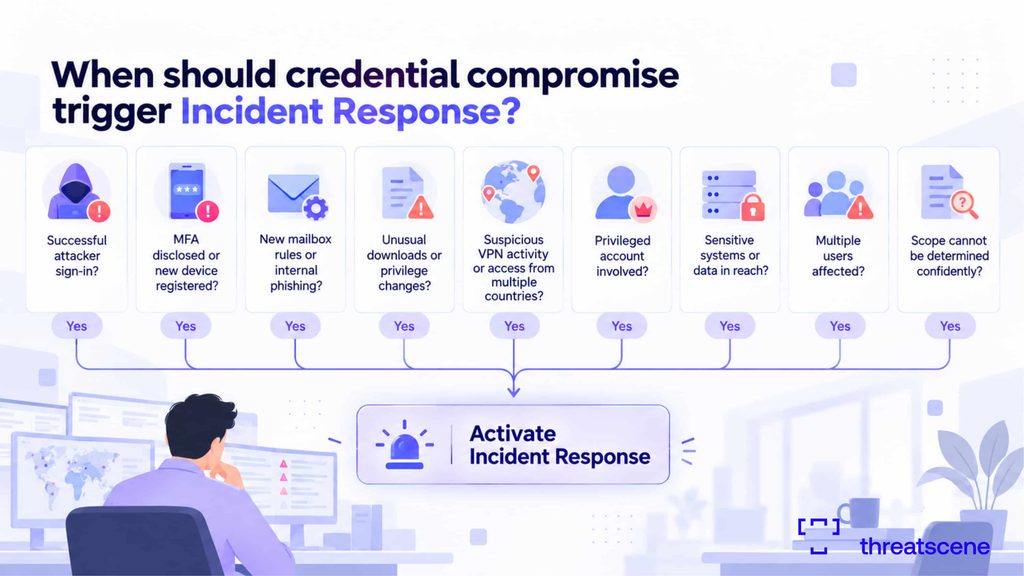
Escalate when you see any of these:
- A successful attacker sign-in
- Disclosed MFA, or a newly registered device
- New mailbox rules, or internal phishing sent from the account
- Unusual file downloads, or privilege changes
- Access from multiple countries, or suspicious VPN activity
- A privileged account, or sensitive systems and data in reach
- Several users affected
- Scope you cannot determine with confidence
That last one is the honest trigger. Uncertainty about scope is itself a reason to treat the event seriously.
The notification clock
Response isn’t only technical. Several legal regimes start a clock the moment you become aware of a breach, and the trigger depends on what data was exposed and where you operate.
The clearest example is the EU General Data Protection Regulation. Where a personal data breach is likely to risk people’s rights and freedoms, Article 33 requires notification to the supervisory authority without undue delay and, where feasible, within 72 hours of becoming aware. Because GDPR follows the data, it can apply to organisations well outside the EU when they handle EU or EEA residents’ personal data.
GDPR is one example among many. A large number of jurisdictions run their own breach-notification rules, with different clocks, thresholds and regulators, and specific sectors add more. Which apply to you, and how fast, depends on your footprint and the data involved.
The practical point holds wherever you’re based. Decide in advance who owns the notification decision, and know which clocks you’re running against. Working that out mid-incident wastes hours you don’t have. Confirm the obligations that apply to your organisation with qualified legal counsel before you rely on them.
3 cases that change the response
The account had privileged access. Raise the threshold. Admin, cloud, finance, help desk, security and executive accounts can allow configuration changes, new accounts, altered security controls, deleted logs and easy lateral movement. Treat a privileged compromise as a major incident until your investigation proves otherwise.
The password was reused elsewhere. If reuse is likely, identify the other corporate systems that share the credential, reset them, and review their authentication activity. Keep this to corporate accounts. Don’t ask employees for their personal passwords.
Should you reimage the device. Not automatically. If the employee only typed credentials into a fake website, the endpoint itself may be clean. If they opened an attachment, installed software, ran commands, followed “ClickFix”-style paste-and-run instructions, enabled macros or downloaded a payload, the endpoint moves up the priority list and needs proper examination.
Evidence to preserve
Preservation and remediation should happen together. Rushed cleanup destroys the record you’ll want later, and legal or regulatory follow-up can turn on it.
Keep the phishing email and its headers, the URLs and attachments, authentication logs, endpoint logs, cloud audit logs, mailbox rules, MFA logs, VPN logs, relevant screenshots, a timeline of the employee’s actions, and the suspicious IP addresses you identified.
Preventing a repeat
Skip the generic “more awareness training” conclusion. Use what this specific incident taught you.
- Tighten identity with phishing-resistant MFA, conditional access and least privilege. This cuts both the chance and the blast radius
- Improve detection: monitor for suspicious sign-ins, impossible travel, new OAuth grants and anomalous sessions
- Make reporting fast and blameless, because a delayed report is what widened this window
- Run a targeted simulation that recreates the actual scenario, not a generic template
- Fix the process gap that let the attacker keep going after the first mistake
These fixes address this incident. Closing the wider gaps that let social engineering reach an employee in the first place is a bigger job.
Make identity attacks part of your IR plan
Many incident response plans centre on ransomware, malware and server compromise, and leave identity-based attacks thinly covered. Given that credential abuse is the most common route into a breach, that’s a gap worth closing.
Define, before an incident, who does what:
- Who disables accounts, and who revokes sessions and tokens
- Who reviews the logs
- Who contacts the employee
- When response is formally activated
- When legal and compliance are pulled in
- How evidence is preserved
- How affected business units are told
Decisions made calmly in advance are the ones that hold up under pressure.
Board and CISO checklist
- Do our people know exactly where and how to report a suspected credential compromise, fast
- When an account is hit, do we revoke sessions and tokens, or only reset the password
- Do we have a defined process to scope the access window, or do we improvise each time
- Who owns the breach-notification decision, and which regulatory clocks apply to us
- Does our IR plan cover identity-based attacks specifically, or only malware and ransomware
- Do we have an incident response retainer, or a defined escalation path for when scope exceeds our team
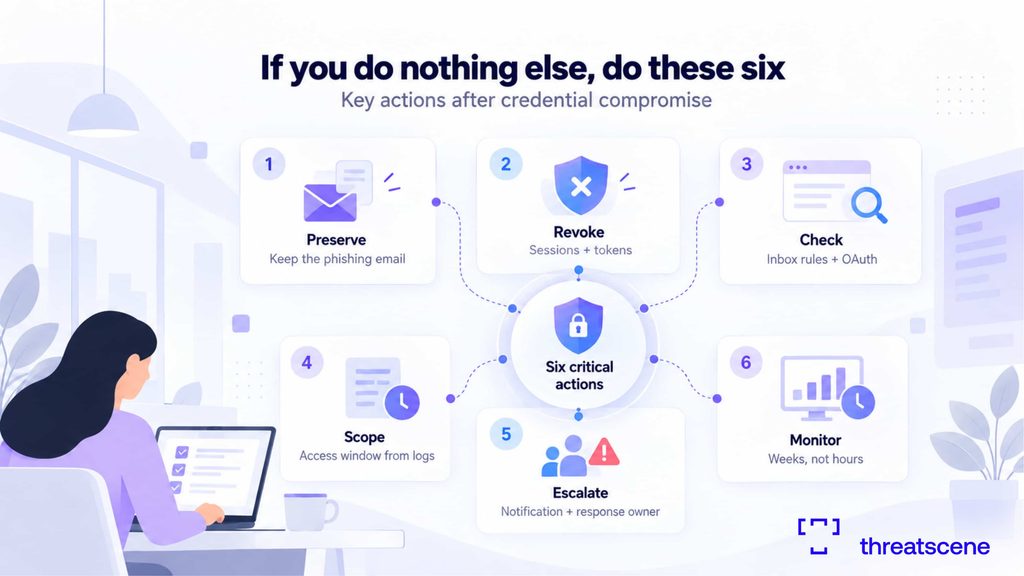
If you do nothing else, do these six
- Preserve the phishing email before anyone deletes anything
- Revoke sessions and tokens, not just the password
- Check for attacker-created inbox rules and OAuth grants
- Scope the access window from the authentication logs
- Decide who owns the notification call, and start the clock
- Monitor the account for weeks, not hours
Is changing the password enough after a phishing attack?
Often not. If the attacker captured a live session cookie or token, they can stay signed in after the reset. Revoke active sessions, refresh tokens, and check for added MFA methods and OAuth grants.
Can attackers stay logged in after a password reset?
Yes. A stolen session cookie can grant access without the password, which is why session and token revocation matters as much as the reset.
When should incident response be activated after phishing?
When credentials were entered and used, when MFA was disclosed, when a privileged account is involved, when sensitive systems or data were in reach, when several users are affected, or when you can’t confidently determine the scope.
Should the employee’s laptop be wiped after a phishing attack?
Not automatically. Credentials typed into a fake site may leave the device clean. If the employee ran software, opened an attachment or followed paste-and-run instructions, investigate the endpoint before deciding.
What logs should we check after credential theft?
Authentication and sign-in logs, session and token activity, mailbox rules and sent items, MFA and device changes, OAuth grants, cloud audit logs and VPN logs.
How long should we monitor a compromised account?
For a defined period after recovery, not just until the reset completes. Attackers sometimes go quiet and return. Set the window in your process rather than deciding case by case.
What good looks like
Credential compromise is a test of process, not luck. The organisations that handle it well decided in advance how they’d contain, investigate and escalate, and they’d practised it at least once.
Run your own plan against the scenario in this article. If the answers aren’t clear, that’s the gap to close before an attacker finds it. ThreatScene’s incident response and digital forensics teams work with organisations through exactly these situations, and can help pressure-test your readiness before one happens.
Stay ready. Stay resilient. Stay operational.
Curated with purpose, delivered with precision | ThreatScene Team

Sources
- Microsoft Security. “From cookie theft to BEC: Attackers use AiTM phishing sites as entry point to further financial fraud.” https://www.microsoft.com/en-us/security/blog/2022/07/12/from-cookie-theft-to-bec-attackers-use-aitm-phishing-sites-as-entry-point-to-further-financial-fraud/
- Verizon. 2025 Data Breach Investigations Report. https://www.verizon.com/dbir
- IBM. Cost of a Data Breach Report 2025. https://www.ibm.com/think/x-force/2025-cost-of-a-data-breach-navigating-ai